OpenAI’s New Pets Feature for ChatGPT Desktop App
Overview
OpenAI has introduced a new feature called Pets in its ChatGPT desktop app, adding a playful animated companion that assists users in managing their tasks and conversations. This feature began with a soft launch in May 2026 and expanded with the Quick Chat function in September 2026.
Key Features:
- Animated Companion: The pet floats above other windows, providing status updates on your chats – whether ChatGPT is processing a request, waiting for a reply, or has completed a task.
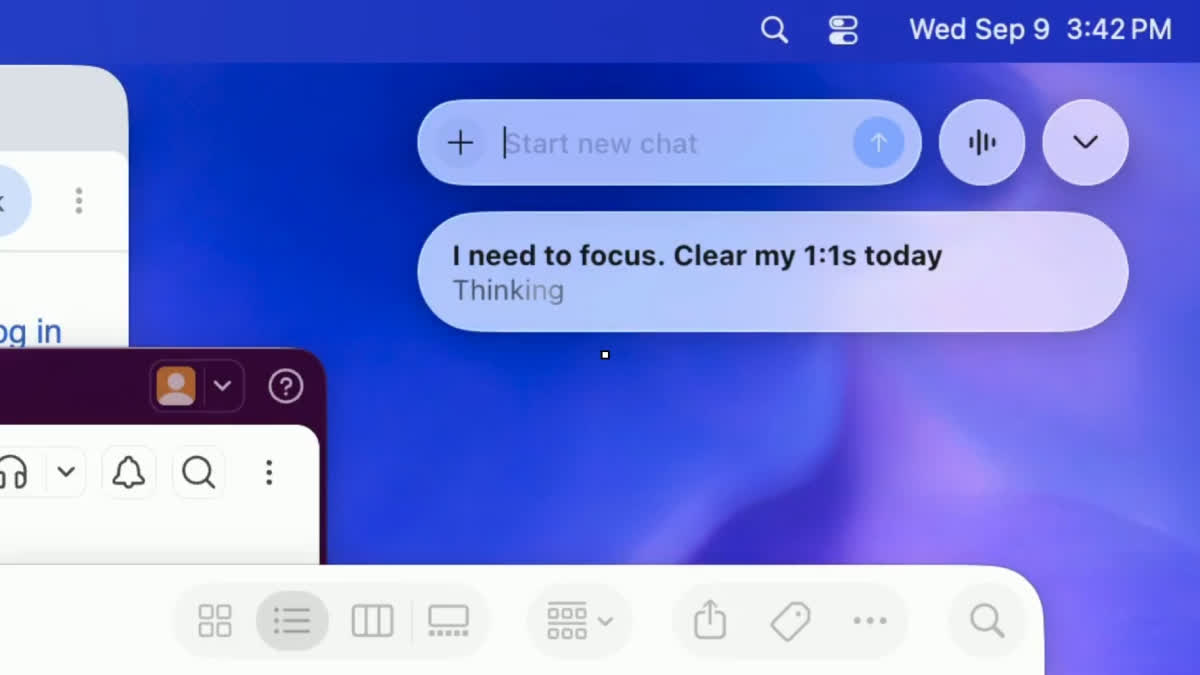
- Quick Chat Function: Users can type or speak to the pet from a small input box, eliminating the need to switch to the main ChatGPT window.
- Task Management: The pet can help track conversations and allows users to issue quick commands like “I need to focus” or “clear today’s meetings.”
Mini Option:
For users who find the animated pet distracting, there’s a Mini option available that displays only a compact control panel.
How to Setup the Pets Feature
Step-by-step Instructions:
- Open the ChatGPT desktop app.
- Go to Settings.
- Select the Pets section and choose a pet character or the Mini option.
- Activate the Pet by typing /pet or selecting Show pet from the command menu.
Customization:
- Users can select from pre-built pets or create a custom one through the Create pet option, which comes with bundled skills.
Keyboard Shortcuts:
- Mac Users: Option + Space
- Windows Users: Windows + Alt + P
Additional Features:
- Users can send Appshot screenshots directly to the pet, provided permissions are enabled and the main ChatGPT window is open.
- The Pets feature is available on both macOS and Windows, though availability may depend on app updates and workspace settings.
For users looking to streamline their productivity while enjoying a touch of whimsy, the new Pets feature offers a unique and interactive way to enhance the ChatGPT experience.

