In today’s fast-paced digital landscape, AI tools have transformed from mere curiosities to essential operational costs. After extensive experimentation with various platforms, I’ve curated a selection of AI subscriptions that consistently deliver value, reliability, and tangible results. My focus has been on tools that save time, minimize distractions, and facilitate efficient outcomes.
In this overview, I will outline the AI subscriptions that I continue to use, explaining their advantages over free alternatives and the myriad of trials that are nice to have but not necessary. This serves as an insightful report from someone who routinely navigates code editors, design tools, and research environments.
I gauge the effectiveness of a tool based on the time it saves, rather than its novelty. If a service can convert hours of work into mere minutes, it earns a place in my toolkit. Conversely, tools that complicate tasks or introduce inefficiencies are quickly discarded, regardless of their impressive presentations.
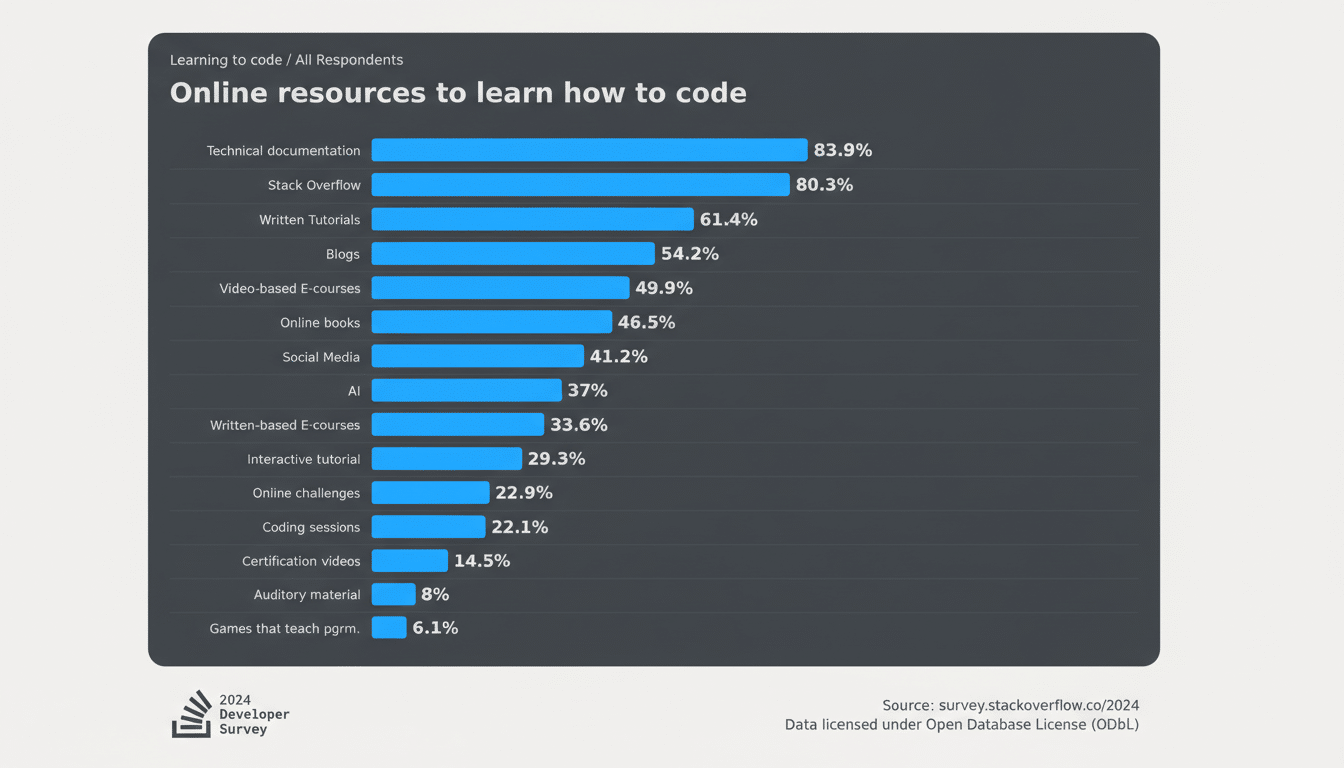
This aligns with wider industry findings: research from MIT reveals that generative AI can enhance productivity by up to 37% for specific tasks, while the latest developer surveys indicate that AI assistants have become common across many coding environments. Analysts predict ongoing growth in AI software spending as organizations transition from experimental use to full integration within their workflows. The takeaway is clear: the greatest return on investment comes from AI that seamlessly intertwines with everyday tasks, as opposed to sporadic application.
The Core Keepers for Daily Work and Coding Sprints
ChatGPT Plus ($20/month) remains indispensable for handling countless micro-tasks, such as organized research, data cleaning, and troubleshooting. The free version works for casual users, but the paid edition’s enhanced capabilities truly transform it into a reliable assistant. During particularly busy weeks, Plus has saved me 3-5 hours by refining chaotic CSVs, drafting briefs, and generating unit tests that I would otherwise postpone.
Claude Code Max ($100/month) is my go-to during intense development cycles. This terminal-first tool aligns with how developers actually produce code: planning, structuring, executing, reviewing, and refining. In a dedicated sprint, I developed several production-ready WordPress security plugins—work that would usually take an entire quarter for a solo developer. However, this tool has usage limits; for consistent high-volume coding, factor in the cost of upgrading to avoid throttling mid-project.
Both ChatGPT Plus and Claude Code Max excel for distinct reasons: the former for versatility and everyday dependability, and the latter for in-depth development work. If coding is infrequent for you, Plus may suffice, but for those deploying features weekly, Claude Code Max offers swift returns on investment.
Visuals That Earn Their Keep for Creative Workflows
Midjourney Basic ($10/month) serves as my creative playground. When a campaign or product idea demands immediate visual direction, it produces unique styles and variations to inspire decisions. While I can generate decent images with other tools, Midjourney’s artistic diversity is unparalleled for exploratory projects. If you frequently propose concepts or create storyboards, this tool can be a cost-effective asset.
The Adobe Photoshop Photography Plan ($20/month) is essential due to my familiarity with its interface, and the Firefly-powered features like Generative Fill streamline tedious processes. I opted for this plan over the full Creative Cloud suite after realizing I was paying for applications I rarely used. One caveat: Adobe’s model for generative credits might necessitate a $10 add-on during busier months. Nevertheless, this reduction from the all-apps plan allows for the budget to be reallocated to tools that drive daily impact.
This strategic pairing covers the spectrum: Midjourney for creative ideation, and Photoshop for detailed editing and finalization. If your focus is solely on static social graphics, options like Canva may suffice, but for professional precision within deadlines, Photoshop is invaluable, ultimately saving me billable hours.
Workflow Utilities Worth the Fee for Real Productivity
Notion AI Business ($20/month) is a tool I use selectively yet effectively. It particularly excels in database-focused work, automatically structuring tables, converting lists into relational records, and generating coherent summaries from extensive notes. Although I don’t use it daily, when I do, it significantly reduces repetitive workload that can impede larger projects.
The OpenAI API (pay-as-you-go) is an unsung hero in my toolkit. I utilize it for automated keyword generation and summarization in a self-hosted article database; processing thousands of items cost me less than a single dinner. The ongoing minimal usage is barely noticeable. For those needing consistent backend tasks—like tagging, semantic search, or speech-to-text—the API is often much cheaper than accumulating multiple subscription costs.
Short-term Tests and Near-Keepers on the Watchlist
Gemini’s paid version is currently under review for another cycle. I find its capabilities for multimodal prompts and image editing promising and want to explore its performance in relation to my actual workloads further. However, its overlap with ChatGPT’s latest image functionalities makes it a temporary expense rather than a permanent addition.
I also experimented with Canva Pro and several associated image generators. While they are helpful for quick social media graphics, they fall short for me, given that I already use Midjourney and Photoshop. These trials were simple to discontinue.
What I Dropped or Downgraded and Why It Didn’t Last
I eliminated my full Adobe Creative Cloud subscription upon realizing that I was spending half my AI budget on unused applications. By opting for the photography plan plus occasional generative credits, I now access 90% of what I need at a fraction of the expense. The key takeaway is to audit for “platform tax”—bundles may appear efficient until you scrutinize actual use.
I also refrain from stacking multiple chatbot subscriptions. Maintaining two or three paid assistants over extended periods yields negligible benefits compared to utilizing one primary tool and a specialized alternative. Streamlining saves both finances and mental bandwidth.
Who Should Pay for What Across Roles and Workloads
Developers and technical founders should allocate funds for one robust coding assistant during intense development phases, while considering downgrading between projects. Marketers and creatives should combine one ideation tool (like Midjourney) with a high-quality production editor (such as Photoshop or an equivalent). Researchers and operations teams are encouraged to rely on API-based automations alongside a single, proficient chatbot instead of spreading resources across multiple licenses.
On a tactical note, set a monthly limit for AI expenditure, review expenses weekly, and quickly cancel any subscriptions that see reduced utilization. I maintain a record of each tool’s last major contribution to my productivity—if I can’t cite a relevant win within the last month, that subscription is reconsidered.
To sum up, the AI tools that merit investment are those that can be directly credited for tangible outcomes. For me, that includes ChatGPT Plus, Claude Code Max, Midjourney, a streamlined version of Photoshop (with the occasional credits), Notion AI during data-heavy weeks, and cost-effective API automations. Everything else must justify its place amid my ongoing commitments.